


On forums, people often post lists of proxies – fresh ones, “leaked” ones, private ones, any kind. A file with 500–5000 lines, and everyone has the same question: Which of these actually work?
Before, you had to install Python, figure out the libraries, and write scripts. Or run the list through dubious online services that might save your proxies for themselves.
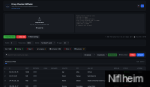
Now it's easier: opened the HTML file → uploaded the list → clicked "Check" → received the ready list of working cards. Everything is local, nothing is sent anywhere, proxies don’t leak.
How to use it.
Just download the Zip archive with the files, put it wherever you want, and double-click it. ProxyChecker.html — and it works. No installation is required, internet is only needed for the proxy check itself.
If the browser suddenly misbehaves (rare, but it happens), launch a simple server next to it: python -m http.server and open localhost:8000.
Step 1. Upload the proxy list.
Three options to choose from:
- Drag and drop the file. directly into the window (supports .txt, .csv, .list)
- Click “Choose file” — as usual
- Insert text in the right field, if you copied the list from the forum.
Example:
185.22.174.91:8080
185.22.174.91:8080:user:pass
http://185.22.174.91:8080
socks5://user:[email protected]:1080Step 2. Click "Check All"
The program will start checking each proxy:
- Is the IP live?
- Is the port open?
- In which country is it located?
- What is his provider (ASN)?
The progress is immediately visible: green means working, red means dead, yellow means being checked.
Step 3. Collect the result.
Button “Export” opens a window where you select:
- What to export: all / only live / only dead
- What to include: only IP:port or full information (country, city, ASN)
- Format: .txt, .csv, .json, .xlsx (will open in Excel)
Browser cannot connecting to a proxy directly is a security limitation of all modern browsers. Therefore, the check works as follows:
- GeoIP — country and provider are determined by IP address using a public API.
- Port availability — checks if the server responds on this port.
Questions and suggestions. — Post in the thread. If you need to add support for other formats, translate to another language, or anything else, let's discuss it.
Attachments
-
59.4 KB Views: 0